grep -rl PM_NOV_2018 | xargs sed -i 's/PM_NOV_2018/PM_OCT_2019/g'
วันพุธที่ 9 ตุลาคม พ.ศ. 2562

วันจันทร์ที่ 9 กันยายน พ.ศ. 2562
To find biggest file in top 5 in directory linux
How to Find Biggest Files and Directories in Linux
Run the following command to find out top biggest directories under
/home partition.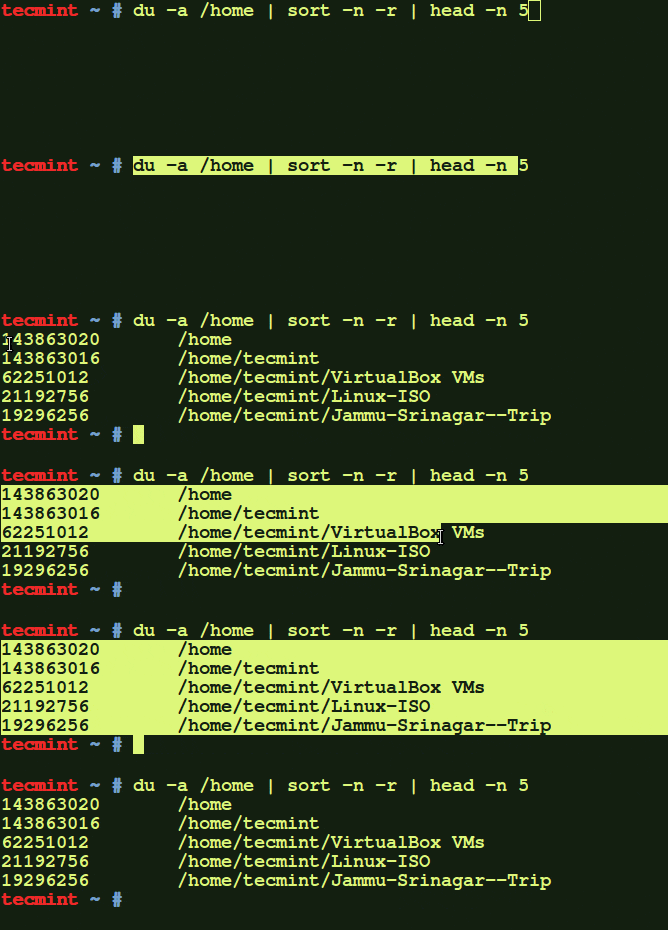
Find Largest Directories in Linux
The above command displays the biggest 5 directories of my /home partition.
Find Largest Directories in Linux
If you want to display the biggest directories in the current working directory, run:
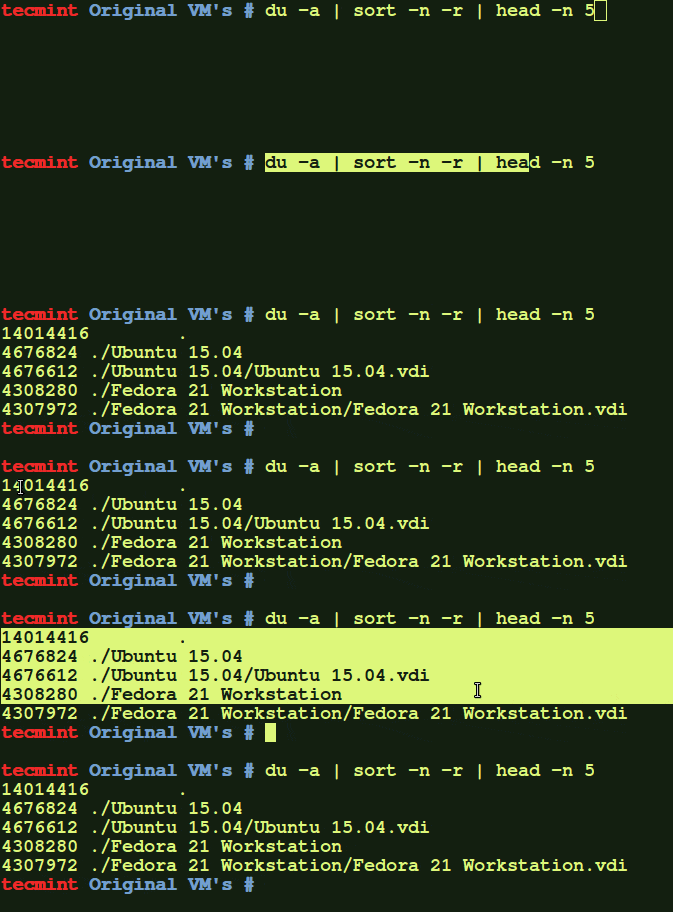
Find Biggest Directories Only
Let us break down the command and see what says each parameter.
ducommand: Estimate file space usage.a: Displays all files and folders.sortcommand : Sort lines of text files.-n: Compare according to string numerical value.-r: Reverse the result of comparisons.head: Output the first part of files.-n: Print the first ‘n’ lines. (In our case, We displayed first 5 lines).
Some of you would like to display the above result in human readable format. i.e you might want to display the largest files in KB, MB, or GB.
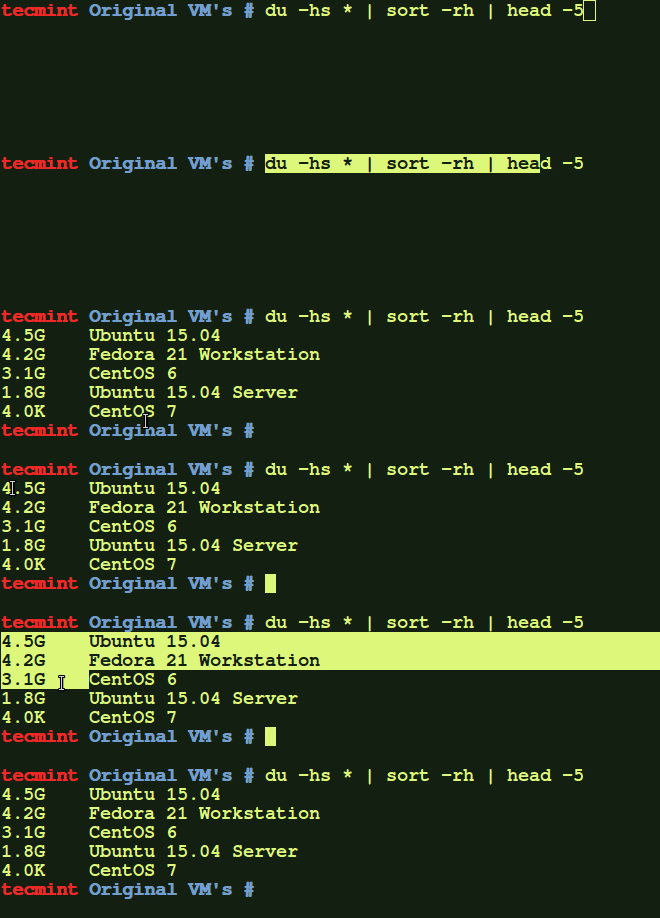
Find Top Directories Sizes in Linux
The above command will show the top directories, which are eating up more disk space. If you feel that some directories are not important, you can simply delete few sub-directories or delete the entire folder to free up some space.
To display the largest folders/files including the sub-directories, run:
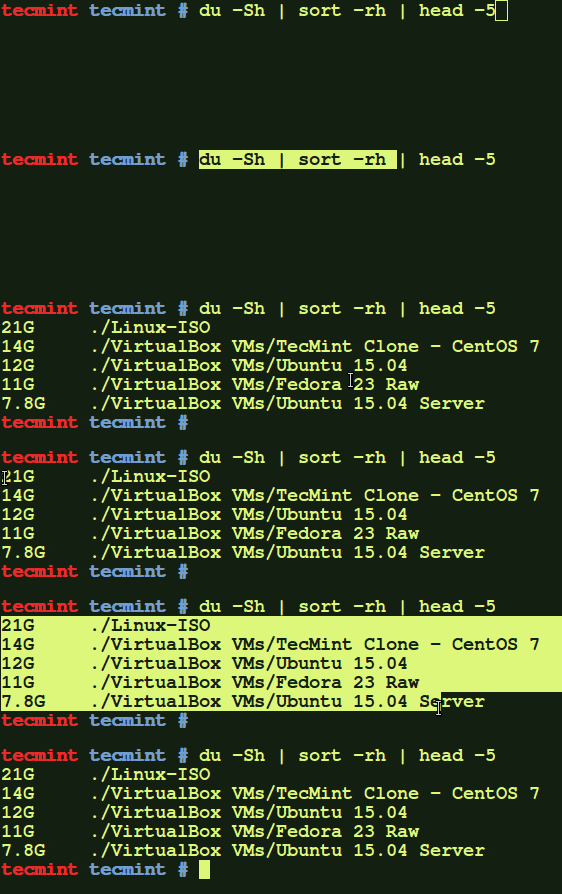
Find Largest Folder and Sub directories
Find out the meaning of each options using in above command:
ducommand: Estimate file space usage.-h: Print sizes in human readable format (e.g., 10MB).-S: Do not include size of subdirectories.-s: Display only a total for each argument.sortcommand : sort lines of text files.-r: Reverse the result of comparisons.-h: Compare human readable numbers (e.g., 2K, 1G).head: Output the first part of files.
Find Out Top File Sizes Only
If you want to display the biggest file sizes only, then run the following command:
find -type f | xargs -I {} du -h {}

Find Top File Sizes in Linux
To find the largest files in a particular location, just include the path besides the
find command:
วันอาทิตย์ที่ 10 กุมภาพันธ์ พ.ศ. 2562
idrac CLI
# power server off
racadm serveraction powerdown
# power server on
racadm serveraction powerup
# perform server power cycle
racadm serveraction powercycle
# force hard server power reset
racadm serveraction hardreset
# display current power status of server
racadm serveraction powerstatus
expect ssh to output file
#!/usr/bin/expect -f
set user "root"
set password "toor"
set ip "10.0.0.88"
spawn ssh $user@$ip
expect "password:"
sleep 1
send "$password\r"
expect ">" {send "racadm getsysinfo\r"} >/home/ssh.txt
expect ">" {send "exit\r"}
set output [open "outputfile.txt" "a+"]
set outcome $expect_out(buffer)
puts $output $outcome
close $output
expect EOF
set user "root"
set password "toor"
set ip "10.0.0.88"
spawn ssh $user@$ip
expect "password:"
sleep 1
send "$password\r"
expect ">" {send "racadm getsysinfo\r"} >/home/ssh.txt
expect ">" {send "exit\r"}
set output [open "outputfile.txt" "a+"]
set outcome $expect_out(buffer)
puts $output $outcome
close $output
expect EOF
วันอังคารที่ 18 ธันวาคม พ.ศ. 2561
วันอาทิตย์ที่ 2 ธันวาคม พ.ศ. 2561
Download MP4 high quality from youtube with Linux
youtube-dl -4 -f bestvideo+bestaudio https://www.youtube.com/watch?v=EeDOw-j_Hhc
วันอังคารที่ 24 ตุลาคม พ.ศ. 2560
Using to crunch generate number password
13 crunch
14 crunch --help
15 man crunch
16 crunch 10 10 -t 09%%%%%%%% -o /root/09x.txt
17 ls
18 zip 09x.txt
19 zip 09x.txt 09x.txt.zip
20 zip 09x.txt.zip 09x.txt
21 crunch 10 10 -t 08%%%%%%%% -o /root/08x.txt
22 zip 08x.txt.zip 08x.txt
23 history
14 crunch --help
15 man crunch
16 crunch 10 10 -t 09%%%%%%%% -o /root/09x.txt
17 ls
18 zip 09x.txt
19 zip 09x.txt 09x.txt.zip
20 zip 09x.txt.zip 09x.txt
21 crunch 10 10 -t 08%%%%%%%% -o /root/08x.txt
22 zip 08x.txt.zip 08x.txt
23 history
วันจันทร์ที่ 9 ตุลาคม พ.ศ. 2560
ftp put then delete all local files
ncftpput -u admin -p admin -R -DD 192.168.1.3 / /root/testftp_need_delete/
วันพุธที่ 20 กันยายน พ.ศ. 2560
Linux youtube-dl with Playlist
[Download all in Playlist]
youtube-dl --extract-audio --audio-format mp3 --audio-quality 0 -ci https://www.youtube.com/playlist?list=PLtkobr6wagHU67Ajtmmp31UTVcabMByK-
[Download each file]
youtube-dl --extract-audio --audio-format mp3 --audio-quality 0 https://www.youtube.com/watch?v=JGwWNGJdvx8
youtube-dl --extract-audio --audio-format mp3 --audio-quality 0 -ci https://www.youtube.com/playlist?list=PLtkobr6wagHU67Ajtmmp31UTVcabMByK-
[Download each file]
youtube-dl --extract-audio --audio-format mp3 --audio-quality 0 https://www.youtube.com/watch?v=JGwWNGJdvx8
วันพุธที่ 13 กันยายน พ.ศ. 2560
HOW TO FIX SMALL SCREEN TEAMVIEWER HOST ON RASPBERRY PI????
HOW TO FIX SMALL SCREEN TEAMVIEWER HOST ON RASPBERRY PI????
++++++++++++++++++++++++++++
FOLLOWING THIS STEP:
1, EDIT config.txt in boot, do sudo nano /boot/config.txt
2, Remove # before: === disable_ovescan === framebuffer_width === framebuffer_height change resolution to 1280x720 Do, Ctrl+O, enter to save.
3, Reboot 4, Waiting and connecting to your Pi with Teamviewer on your PC again. ===========THE BUG was fixed============ ENJOY HAVE A NICE DAY!!!
1, EDIT config.txt in boot, do sudo nano /boot/config.txt
2, Remove # before: === disable_ovescan === framebuffer_width === framebuffer_height change resolution to 1280x720 Do, Ctrl+O, enter to save.
3, Reboot 4, Waiting and connecting to your Pi with Teamviewer on your PC again. ===========THE BUG was fixed============ ENJOY HAVE A NICE DAY!!!
[GUIDE] Raspbian Lite with PIXEL/LXDE/XFCE/MATE/i3 GUI
https://www.raspberrypi.org/forums/viewtopic.php?f=66&t=133691
วันจันทร์ที่ 24 เมษายน พ.ศ. 2560
[MKT] Block facebook 25 APR 2017
1. create address list in /ip firewall address list
1.1 address facebook.com
1.2 define name Fb
Result :
/ip firewall address-list
add address=facebook.com list=fb
2. create firewall filter rules
/ip firewall filter
add action=drop chain=forward comment="FW Rule Block FB testing" \
dst-address-list=fb dst-address-type="" src-address=10.0.0.4
***src-addr may be host or network***
1.1 address facebook.com
1.2 define name Fb
Result :
/ip firewall address-list
add address=facebook.com list=fb
2. create firewall filter rules
/ip firewall filter
add action=drop chain=forward comment="FW Rule Block FB testing" \
dst-address-list=fb dst-address-type="" src-address=10.0.0.4
***src-addr may be host or network***
สมัครสมาชิก:
ความคิดเห็น (Atom)